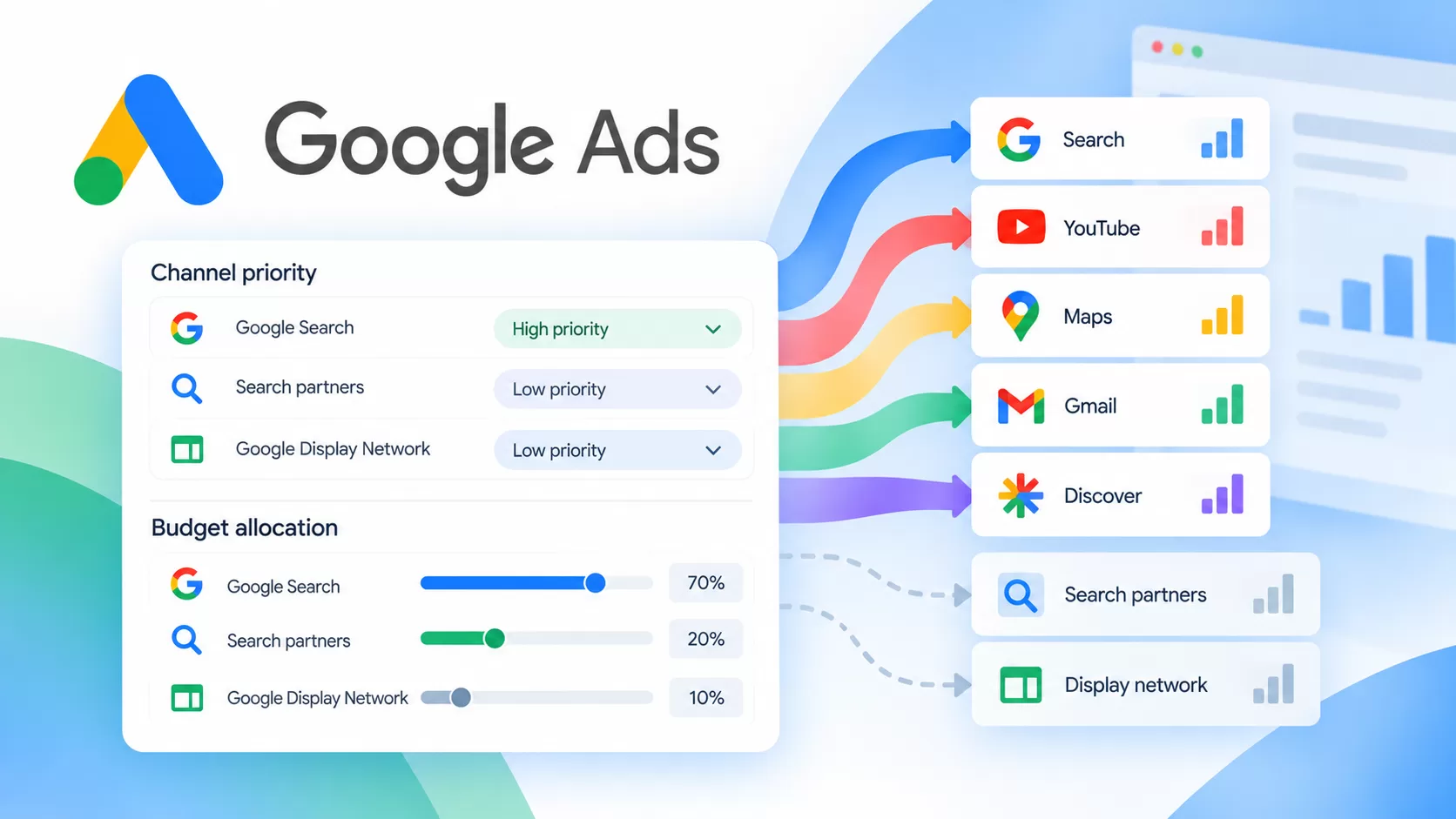
An air conditioning company runs a Search campaign in Google Ads with 30 euros a day. When the campaign was set up, the option to include Google's Display Network was left on, because it seemed to offer "more reach". By the end of the month, part of the budget had gone to banner ads inside apps and websites with little connection to anyone searching for "install air conditioning". Almost all the quote requests came from Search.
Until now, the choice was almost always all or nothing: switch Display off, or accept that Google decided how much to spend there. On 14 October 2026, Google announced a third way, and it is worth understanding how it works before touching the account.
What Google announced on 14 October 2026
According to the announcement on the Google Ads blog, signed by Tal Akabas, director of product management, Google Ads now has two optional controls:
- Channel prioritisation. Each channel (or group of channels) in a campaign can be marked as high or low priority. High-priority channels are funded first; whatever is left of the budget goes to low-priority channels.
- Budget allocation. For low-priority channels, you can set a maximum percentage of the average daily budget those channels may spend.
In short: since 14 October 2026, Google Ads lets you rank a campaign's channels by priority and cap, as a percentage of the daily budget, how much the secondary channels can spend.
The rollout is gradual "over the coming months" across Search, Shopping, Performance Max and Demand Gen campaigns, and Google's help page warns that availability varies by account. If you do not yet see the option in your account settings, that is normal. The names we use in this article follow Google's English documentation; labels in your interface may differ slightly.
By default, every channel is set to high priority. In other words, nothing changes in your account until you touch this setting, with one exception that already has a date: February 2027, explained below.
Which channels you can rank in each campaign type
Google does not let you rank every channel the same way. What you can separate depends on the campaign type:
| Campaign type | Channels you can rank |
|---|---|
| Search | Google Search, Search partners and Display Network, each separately |
| Shopping | Google Search and Search partners |
| Performance Max | "Google channels" (Search, YouTube, Maps, Gmail, Discover and others, as one block), Search partners and Display Network |
| Demand Gen | "Google channels" and Display Network |
Two important notes. In Performance Max, YouTube sits in the same block as Search: you cannot put YouTube below Search. What you gain control over are Search partners and the Display Network. In Demand Gen, the blog post suggests the percentage exists for all four campaign types, but the help page, at the time of writing, indicates that only the priority order is available there. In practice, what your account shows is what counts.
Configuration happens at three levels: account (applies to all campaigns of that type), shared budget and campaign. According to Google, priorities cannot be set from a manager account, and support in the API and Google Ads Editor is "coming soon".
When priority actually changes something
This is the point most likely to confuse anyone trying the feature. Priority only decides anything when the money does not stretch to everything. If the campaign is not limited by budget, there is no queue to order.
Google's help page describes the effect by bidding strategy:
| Bidding strategy | What happens |
|---|---|
| Target CPA, Target ROAS or Target CPC, not limited by budget | Priority has no effect; only the percentage applies |
| Target CPA, Target ROAS or Target CPC, limited by budget | High-priority channels spend first, within the target; low-priority channels only receive budget if they convert within the target; the percentage applies |
| Maximise conversions, Maximise conversion value, Maximise clicks, Manual CPC, Target impression share | High-priority channels spend first; the rest goes to low-priority channels; the percentage applies |
In day-to-day terms: if you use Target CPA and the campaign rarely exhausts its budget, moving Display to low priority is not enough. You also need to set a percentage. If the campaign spends its full budget every day, which is common for small businesses with tight budgets, priority alone already makes a difference.
What changes in February 2027 for Search campaigns with Display
Today, a Search campaign with Display expansion enabled uses the budget left over from Search to show ads on Display, with a 50% allocation applied internally, according to Google's help page on Display expansion.
From February 2027, those campaigns move automatically to the new system and the current setup is removed. Google warns that spend may shift between Search, Search partners and Display. To keep everything as it is, Google's own recommendation is to set the Display Network to low priority with a 50% daily allocation. There is one more change: the Display Network stops serving in Search campaigns using the Target impression share strategy.
For a small business, February is a good date to decide on purpose rather than inherit a default. "Keep as is" only makes sense if you already know Display brings you enquiries or sales.
How to decide priorities: a five-step method
The temptation is to open the setting, put everything that is not Search on low priority and move on. Sometimes that is the right call. But it should be made with your account's data, not by intuition.
- See where the money is already going. In Search campaigns, segment results by network (Google Search, Search partners, Display). In Performance Max, use the channel performance report, which shows cost, conversions and value per channel. Look at the last 60 to 90 days.
- Confirm the conversion counts what matters. A submitted form, a call of minimum duration, a purchase. If the account counts visits to the contact page as conversions, the per-channel numbers mislead and priority will be decided on wrong data.
- Decide channel by channel. A channel that brings enquiries at an acceptable cost: high priority. A channel without enough history: low priority with a small percentage, to test without risk. A channel that only spends: low priority at 0%, which, according to Google, stops spend on that channel.
- Think of the percentage in euros. 10% of 40 euros a day is about 4 euros a day, close to 120 euros a month. The right question is not "what percentage?" but "how much am I willing to spend per month to test this channel?".
- Review after two to four weeks. With small budgets, a few days of data rarely support conclusions. Record the date of the change so you can compare before and after.
Three illustrative situations, to show the reasoning (the right values depend on each account's data):
- B2B industrial maintenance company, Search campaign at 50 euros a day with Maximise conversions. Google Search on high priority. Search partners on low priority with a small percentage while there is no data. Display on low priority at 0%, if it has never generated a qualified enquiry.
- Home goods online store, Performance Max with Target ROAS, which does not always exhaust its budget. Here priority alone changes little; the percentage is what counts. Before Black Friday, it may make sense to cap Display at a modest share and, at the same time, keep an eye on the automated assets Google Ads builds from your website, because both affect ads in this season.
- Douro hotel with a Demand Gen campaign for direct bookings. Google channels on high priority, Display on low priority. According to the help page, Demand Gen has no percentage, only the order.
The limits worth knowing
The feature gives more control, but it is not an exact switch. According to Google's documentation:
- The percentage is a target, not a guarantee. Google says it tries to keep spend within the cap "on a best-effort basis" and that spend may occasionally exceed it.
- It is calculated on the average daily budget, not on actual spend. And it resets every day, with no carry-over of what was underspent or overspent.
- Daily spend can reach twice the budget. The help page on average daily budget explains that, on any given day, a campaign can spend up to twice its average daily budget. The percentage for low-priority channels is still calculated on the average budget.
- Shared budgets count as a whole. The cap applies to the entire shared budget, not to each campaign's share.
- Some situations are excluded. In custom experiments, all channels are treated as a single tier. Campaign total budgets are only supported in Demand Gen.
In the coverage from Search Engine Roundtable and Search Engine Land, two specialist outlets that follow Google Ads closely, the points stressed are the same: the cap is approximate and the rollout is gradual.
What this control does not solve
Channel prioritisation decides where the money is spent first. It does not decide whether what the account measures is a sale or a real enquiry.
If conversion tracking is misconfigured, Google will keep optimising for the wrong signal, now with one more dial to adjust. Before changing priorities, it is worth confirming that Google Analytics and conversions are tied to customers and not just to visits. And, if the company invests in several channels, understanding which channel actually creates customers and which merely catches them at the end of the journey.
The good news is that, for the first time, a small business with a 30 or 50 euro-a-day campaign can tell Google "Search first, then the rest, and the rest up to this amount", without having to choose between all and nothing. Used with data, it is a simple way to protect the budget where it earns most.
How Digito helps
If you run Search or Performance Max campaigns and do not know what share of the budget goes to the Display Network or Search partners, we can start by analysing the last 90 days of the account, channel by channel, confirming that conversions measure real enquiries, and proposing priorities and percentages before the February 2027 change. It is the work we do in paid traffic management, and it ends with the change logged in the account, so that a month later you can compare before and after.
If you want to know where your Google Ads budget is being spent first, talk to us at digitosolutions.com.
Sources
- Google Ads & Commerce Blog, Guide your campaign spending with new priority and allocation features, 14 October 2026
- Google Ads Help, article 18385152, channel prioritisation and budget allocation (defaults, effect by bidding strategy, 0%, levels and limitations)
- Google Ads Help, article 7193800, Display expansion in Search campaigns, and article 2375423, average daily budget
- Google Ads Help, article 16260130, Performance Max channel performance report
- Search Engine Land, Google Ads introduces channel prioritization and budget allocation controls, 14 October 2026
- Search Engine Roundtable, Google Ads channel prioritization and budget allocation, 14 October 2026